A free plugin for all your clock needs
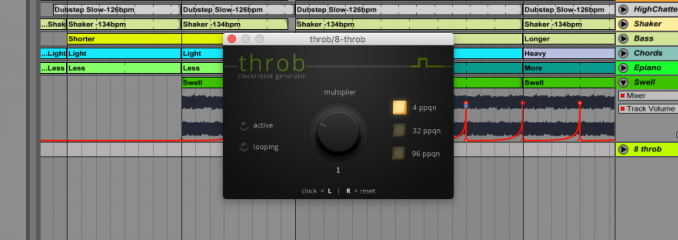
Throb is a free and open-source JUCE based plugin that generates clock/reset signals synchronised with the host tempo. It is currently available for Windows (VST2 and VST3, 32/64 bit) and OS X (VST2, VST3 and AU 32/64 bit).
The user interface is pretty simple: a knob to set the multiplier and three radio buttons to configure the clock resolution.
The multiplier is an automation parameter and therefore can be controlled using the respective host functionality. Both the multiplier and the resolution (ppqn) settings are serialized to the preset chunk.
You won't need a DC coupled audio interface, but please avoid sending the output of the plugin directly to your speakers/headphones.
The user interface is pretty simple: a knob to set the multiplier and three radio buttons to configure the clock resolution.
The multiplier is an automation parameter and therefore can be controlled using the respective host functionality. Both the multiplier and the resolution (ppqn) settings are serialized to the preset chunk.
You won't need a DC coupled audio interface, but please avoid sending the output of the plugin directly to your speakers/headphones.