
Arduino MIDI I/O Board

Basic MIDI output is really easy to do with Arduino, all you have to do is initialize the serial port using Serial.begin(31250), then you can send standard MIDI data using Serial.print function.
If you don't want to mess too much with low level MIDI data handling you can just use the MIDI Library developed by François Best, otherwise just read the MIDI protocol specification and start doing your experiments!
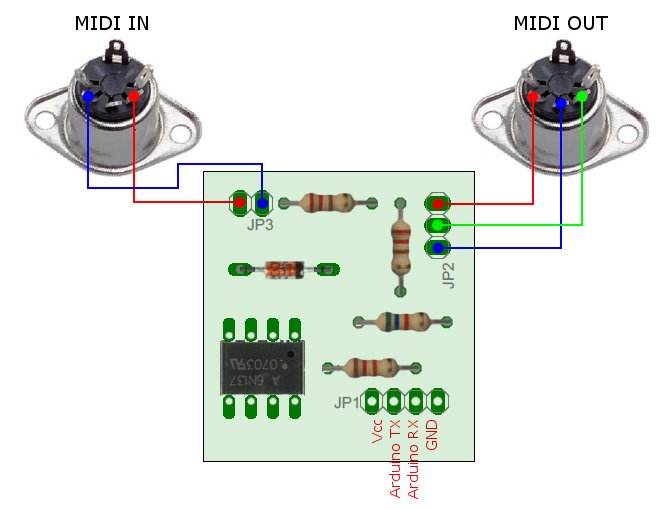
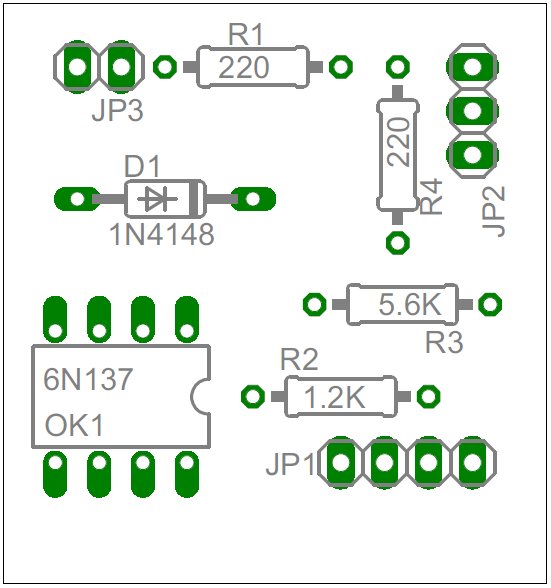

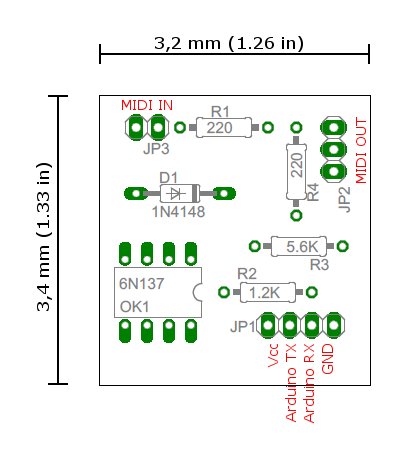
Bill of Materials:
1x Optocoupler 6N137 (OK1)
2x 220 Ohm 1/4 W Resistor (R1,R4)
1x 1.2 KOhm 1/4 W Resistor (R2)
1x 5.6 KOhm 1/4 W Resistor (R3)
1x 1N4148 (D1)
1x IC DIL socket-8Pin (optional, for the 6N137)
1x Male header 2.54mm/0.100" strip (JP1,JP2,JP3)
	/*---------------------------------------------------------*/

	/*   Simple MIDI example                                   */

	/*   Vincenzo Pacella - www.shaduzlabs.com                 */

	/*---------------------------------------------------------*/

	/*                         DataByte1     Data Byte2        */

	/* -------------           ------------  ---------------   */

	#define NOTE_OFF    0x80// Key number    Note Off velocity

	#define NOTE_ON     0x90// Key number    Note on velocity

	#define POLY_KEY_P  0xA0// Key number    Amount of pressure

	#define CONTROL_CHG 0xB0// Controller    Controller value

	#define PROGRAM_CHG 0xC0// Program num   None

	#define PRESSURE_V  0xD0// Pressure val  None

	#define PITCH_BEND  0xE0// MSB           LSB


	int MIDI_channel = 1;   // [1-16]

	int i = 0;


	void setup() {

	  Serial.begin(31250);

	}


	void loop() {

	for(i=0;i<128;i++){

	   sendNoteOn(i,127);  //Send a Note ON

	   delay(50);

	   sendNoteOff(i,0);  //Send a Note OFF

	   delay(50);

	}

	for(i;i>0;i--){

	   sendNoteOn(i,127);  //Send a Note ON

	   delay(50);

	   sendNoteOff(i,0);  //Send a Note OFF

	   delay(50);

	}

	}


	void sendNoteOn(byte note, byte velocity) {

	  sendMidiMessage(NOTE_ON, note, velocity);

	}


	void sendNoteOff(byte note, byte velocity) {

	  sendMidiMessage(NOTE_OFF, note, velocity);

	}


	void sendControllerChange(byte controller, byte value) {

	  sendMidiMessage(CONTROL_CHG, controller, value);

	}


	void sendMidiMessage(byte message, byte data1, byte data2) {

	  Serial.print((MIDI_channel-1)&0x0F|message, BYTE);

	  Serial.print(data1, BYTE);

	  Serial.print(data2, BYTE);

	}